



Introduction: Why This Matters
In my experience, the most underrated keyword research tool in existence is sitting right under your nose—and it’s completely free.
I’ve watched countless bloggers and small business owners spend hundreds of dollars monthly on premium SEO tools, chasing keyword data that’s often estimates layered on top of estimates. Meanwhile, Google Search Console—which provides actual data straight from Google—sits unused in their browser tabs.
What I’ve found is that Search Console is especially powerful for a group most SEO advice ignores: sites with little to no traffic. The common assumption is that GSC is a tool for established sites, something you check after you’ve built an audience. That’s backwards. GSC is most valuable when you’re starting from zero, because it reveals the invisible first steps Google is already taking with your site.
Here’s the reality that changes everything: even if your site gets zero clicks, Google Search Console shows you what Google knows about your content. It reveals queries where you appear in search results—sometimes on page two or three—that you never intentionally targeted . It shows you the exact phrases real people typed before Google decided your page was relevant enough to display.
This guide exists because using GSC for keyword research with zero traffic requires a different mindset than the advice you’ll find elsewhere. You’re not analyzing existing success. You’re detecting early signals, finding near-misses, and building a strategy from the quiet data Google is already collecting.
By the end, you’ll know exactly how to extract keyword opportunities from Search Console, even if your site has 10 impressions and 0 clicks.
Background / Context: Why GSC Data Is Different
Most keyword research tools work the same way: they estimate. They scrape search results, analyze competitor backlinks, apply proprietary algorithms, and present you with a number that approximates search volume and difficulty. Those estimates can be useful. They’re also often wrong, especially for long-tail queries and niche topics .
Google Search Console operates on a fundamentally different principle. It doesn’t estimate. It reports. Every piece of data in GSC comes directly from Google’s systems—what queries triggered your site in search results, how many people saw it, how many clicked, and where you ranked .
For sites with traffic, this distinction is nice-to-have. For sites with zero traffic, it’s everything. Here’s why:
GSC reveals queries that tools miss. Keyword tools often strip out queries with low search volume or set them to zero. But those “zero volume” queries are exactly where new sites can win . GSC shows you these queries anyway, because Google doesn’t care about tool estimates—it cares about what people actually typed.
GSC shows you the “discovery phase.” When Google first indexes a new site, it tests that content against a wide range of queries. GSC’s Performance report captures this testing. You’ll see impressions for queries you never targeted, sometimes for pages you didn’t even think were relevant . These are clues about what Google believes your site is about.
GSC measures real behavior. Impressions, clicks, CTR, average position—these aren’t estimates. They’re measurements. A query showing 500 impressions and 2 clicks tells you something concrete: Google is showing your page to people, but they’re not choosing it. That’s actionable .
The zero-traffic mindset shift is this: you’re not looking for your current success. You’re looking for Google’s current understanding. And GSC is the only tool that shows you that directly.
Key Concepts Defined
Before diving into the process, let’s establish the specific GSC concepts that matter for keyword research.
Search Performance Report: The section of GSC (Performance > Search Results) that shows how your site performs in Google Search. It includes four core metrics and breakdowns by queries, pages, countries, devices, and search appearance .
Query: The actual search term a user typed into Google. GSC shows the queries that triggered your site in search results, whether or not anyone clicked .
Impressions: The number of times your site appeared in search results for a given query. Even if nobody clicks, an impression means Google displayed your link .
Clicks: The number of times someone clicked your link in search results. For zero-traffic sites, this number may be zero. That’s okay.
CTR (Click-Through Rate): Clicks divided by impressions, expressed as a percentage. High impressions with low CTR signals a mismatch between what Google thinks your page is about and what your title/description communicates .
Average Position: The average ranking position of your site for a given query. A position of 15 means you’re on page two. A position of 8 means you’re near the bottom of page one. Positions 11-20 are “striking distance” keywords—close enough to page one that small optimizations can push you over .
Striking Distance Keywords: Queries where you rank positions 11-20. These are the highest-leverage opportunities because you’re already visible to Google, just not to most users. Moving from position 15 to position 8 can dramatically increase traffic .
Regex Filters: Regular expression filters that let you slice GSC data by patterns. For example, filtering queries containing “how” or “what” reveals question-based keywords. Filtering queries not containing your brand name isolates non-branded opportunities .
How It Works: Step-by-Step Breakdown
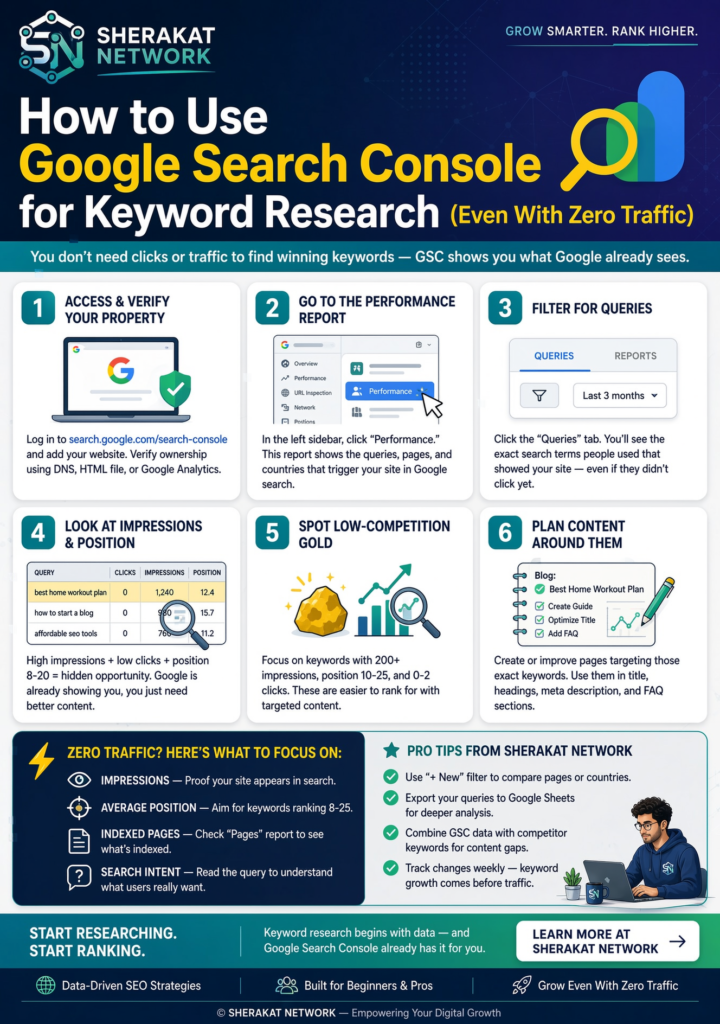
This is the core of the guide. Follow these steps in order, even if your data looks sparse at first.
Step 1: Verify Your Site and Enable Full Metrics
If you haven’t already, connect your site to Google Search Console. Verification gives you access to all data Google collects about your site .
Once verified, navigate to Performance > Search Results. At the top of the report, you’ll see toggles for the four core metrics: Clicks, Impressions, Average CTR, and Average Position. Enable all four .
Why this matters: Many beginners look only at clicks. But for zero-traffic sites, impressions are the leading indicator. Impressions tell you Google is showing your content. Clicks come later. You’re looking for the first sign that Google understands what your page is about.
Step 2: Set the Right Date Range and Filters
The default GSC date range is 3 months. For keyword research, 3 months is a reasonable starting point, but 6-12 months reveals seasonal patterns and trends .
Filters to apply:
- Search type: Set to “Web” for traditional search results. “Image,” “Video,” and “News” behave differently.
- Country: If your audience is location-specific, filter accordingly.
- Device: Mobile and desktop searches often trigger different queries. Review both separately .
For zero-traffic sites: Start with the broadest settings (all countries, all devices, Web search). You need every data point you can get.
Step 3: Sort by Impressions, Not Clicks
This is the single most important shift in mindset for zero-traffic keyword research.
Click the Impressions column to sort queries from highest to lowest impressions. Ignore the clicks column for now .
What you’re looking for: Queries where Google showed your site to people—even if nobody clicked. Those queries represent Google’s current belief about what your content is relevant for.
Example: You might see a query like “how to start a small business with no money” showing 400 impressions and 0 clicks. That’s gold. Google is already displaying your page for that query. You didn’t necessarily target it intentionally. Now you know Google thinks your content is relevant. The next step is figuring out why nobody clicked—and fixing it.
Step 4: Find Striking Distance Keywords (Positions 11-20)
Filter or sort queries by Average Position. Look for queries where you rank between 11 and 20 .
Why this range: Position 11-20 means you’re on page two. Most users never see page two—Backlinko’s CTR analysis shows page two results get only about 0.63% of clicks . But you’re close. You’re visible to Google. A small optimization push can move you to page one, where CTR jumps dramatically.
How to find them in GSC:
- Click the Average Position column header to sort.
- Scan for positions in the 11-20 range.
- Prioritize queries with high impressions within that range.
What I’ve found: For new sites, the striking distance list is often surprisingly large. Google tests new content against many queries before settling on what it “thinks” the page is about. These queries are your roadmap.
Step 5: Use Regex Filters to Find Question Keywords
GSC supports regular expressions (RE2 syntax) for filtering queries. This is the most underused feature in the tool .
How to add a regex filter:
- Click + Add Filter above the Queries table.
- Select Query as the filter type.
- Choose Custom (regex).
- Enter a pattern like:
how|what|why|when|which|can|does
This filters queries to only those containing question words. Question-based queries are often informational, long-tail, and less competitive—perfect for new sites .
Other useful regex patterns:
- Non-brand queries: Filter queries that don’t match your brand name. This isolates organic discovery opportunities .
- Specific topics: Filter for queries containing a keyword relevant to your niche (e.g., “keyword|SEO|search”).
- Modifiers: Filter for “best|vs|review|guide|tutorial” to find commercial and informational intent.
What this reveals: Regex filters turn a wall of query data into targeted opportunity lists. Instead of scrolling through hundreds of queries, you see exactly the types of keywords you want to target.
Step 6: Analyze High-Impression, Low-CTR Queries
Filter or sort for queries with:
- High impressions
- Low CTR (below 2%)
These are queries where Google is showing your page, but users aren’t clicking .
Why this happens:
- Your title and meta description don’t match the query intent.
- The query triggers an AI Overview above your result, reducing clicks.
- Your result looks less compelling than competitors on the same SERP.
- Your page’s content doesn’t clearly signal it answers the query.
What to do: For each high-impression, low-CTR query, Google the query yourself. Look at the SERP. Compare your title and description to the top results. Ask: If I were searching this, would I click my result? If the answer is no, rewrite your title and description to better match intent .
Step 7: Identify Content Gaps from Unexpected Queries
Scroll through your queries and look for terms you never intentionally targeted .
Why this matters: These “accidental rankings” are signals. Google has decided your content is relevant for a query you didn’t write about. That’s information you can use.
Two responses to unexpected queries:
- Optimize existing content: If you have a page that’s ranking for an unexpected query, add a section addressing that topic. Lean into the relevance Google already sees.
- Create new content: If the query represents a topic you haven’t covered, write a dedicated article targeting it. You already know Google considers your site relevant for this subject.
Example: A baking blog might see impressions for “how to fix gummy bread” even though they only wrote a recipe post. Google thinks their content is relevant to troubleshooting. A dedicated troubleshooting guide would likely rank quickly.
Step 8: Export Data for Deeper Analysis
GSC’s interface shows up to 1,000 rows of data. For a new site, that’s more than enough. But as you grow, exporting becomes essential .
Export methods:
- CSV download: Click the Export button in the Performance report. Limited to 1,000 rows.
- Search Analytics for Sheets: A free Google Sheets add-on that pulls up to 25,000 rows of GSC data. This unlocks much deeper analysis .
- GSC API: For programmatic access and unlimited data, use the Search Console API .
What to do with exported data:
- Sort by impressions to find high-visibility queries.
- Filter by position to find striking distance opportunities.
- Group queries by topic to identify content clusters.
- Track changes over time by comparing monthly exports.
Step 9: Turn Query Data into a Content Roadmap
Your GSC query list isn’t just data—it’s a prioritized content plan.
For each high-opportunity query, decide:
- Optimize existing page: If you have a page ranking for the query, update it. Add the query to the title, H1, or a relevant H2. Expand content to cover the topic more comprehensively .
- Create new page: If no existing page targets the query, write a dedicated article. Use the query as your primary keyword.
- Add to FAQ section: For question-based queries, add a concise answer to an existing page’s FAQ section.
Prioritization framework:
- Striking distance queries (position 11-20) with high impressions: Optimize existing pages first. These are fastest wins.
- High-impression, low-CTR queries: Rewrite titles and descriptions. Quick optimization, potentially significant CTR improvement.
- Unexpected queries with no existing content: Create new pages. These represent confirmed relevance Google already sees.
Step 10: Track and Iterate Weekly
SEO moves in patterns, not hours. Check GSC weekly to see how your optimizations affect rankings .
What to track:
- Are striking distance queries moving to page one?
- Are CTRs improving after title/description rewrites?
- Are new queries appearing as you publish content?
- Are impressions growing even if clicks lag?
The iteration mindset: Google rewards iteration, not volume . Updating what already works often outperforms publishing new content blindly. When you see a query start to climb, lean into it. Add more content around that topic. Build internal links to the page. Give Google more reasons to trust your relevance.
Why It’s Important
Using Google Search Console for keyword research isn’t just “a good free option.” It’s the most accurate source of keyword data available, and it’s especially critical for sites starting from zero.
The accuracy advantage. Third-party tools estimate search volume. GSC measures impressions and clicks. Estimates can be wrong by orders of magnitude, especially for niche or long-tail queries. Measurements are real .
The zero-traffic advantage. Most keyword tools ignore queries with low volume. GSC shows them anyway. For new sites, these “invisible” queries are often the only realistic ranking opportunities. Ignoring them means ignoring your best path forward .
The “striking distance” advantage. No other tool shows you exactly where you rank for queries you didn’t target. GSC reveals the queries where Google is already testing your relevance. These are the fastest wins available .
The compounding effect. Every query you optimize builds topical authority. Every striking distance keyword you push to page one strengthens your site’s relevance signals. Over months, this accumulation creates a site that can compete for harder terms .
What happens if you ignore this: You rely on tool estimates that miss your actual opportunities. You target keywords you have no chance of ranking for. You ignore the queries Google is already showing your content for. Six months pass. No traffic. No momentum. The psychological impact is brutal—most people quit at this stage, convinced SEO is rigged. It isn’t. They just used the wrong data source.
Sustainability in the Future
Google Search Console is evolving, and the keyword research use cases are expanding.
AI-powered configuration is rolling out. Google announced in December 2025 an experimental AI-powered configuration tool for the Performance report. You can describe what you want to see in natural language—”Show me mobile queries containing ‘sports’ in the last six months”—and GSC configures the report automatically . This will make regex filters and complex comparisons accessible to non-technical users.
Insights reporting is now integrated. The new Search Console Insights report (launched June 2025) is built directly into the main interface. It highlights “rising” and “declining” pages and queries, making it easier to spot opportunities without manual analysis .
Zero-click searches are growing. As AI Overviews expand, more searches end without clicks. But impressions still count. GSC’s impression data becomes more important, not less, because it shows you where Google considers your content relevant—even when users don’t click .
The sustainable approach: Use GSC as your primary keyword research tool. Let third-party tools handle competitive analysis and backlink research. But for understanding what Google actually thinks about your content, GSC is unmatched. Build your content strategy around the queries Google is already showing you for.
Common Misconceptions
Misconception 1: “GSC is only useful if you already have traffic.” False. GSC’s impression data is available even with zero clicks. For new sites, impressions are the leading indicator of Google’s understanding. This is the most valuable data you can have .
Misconception 2: “If a query shows zero clicks, it’s not worth targeting.” Zero clicks with high impressions means Google is showing your page but users aren’t clicking. That’s a fixable problem—usually a title or description issue. The query itself is validated by Google’s decision to display your content .
Misconception 3: “I need to use the exact query as my keyword.” GSC shows you the queries Google associates with your content. You don’t need to stuff them into your page. You need to understand the intent behind them and ensure your content comprehensively addresses it .
Misconception 4: “GSC data is delayed, so it’s not useful for real-time decisions.” GSC data has a 2-3 day lag. That’s irrelevant for keyword research. You’re analyzing patterns, not chasing breaking news. The lag doesn’t affect the validity of the insights .
Misconception 5: “I should focus on queries with the most impressions.” Impressions matter, but position matters more. A query with 500 impressions at position 45 is less actionable than a query with 100 impressions at position 12. Striking distance beats raw volume for new sites .
Misconception 6: “Third-party tools are more accurate than GSC.” No tool has better data about your site’s actual search performance than Google’s own reporting. Third-party tools estimate. GSC measures .
Recent Developments
Three developments in 2025-2026 have made GSC even more valuable for keyword research:
1. AI-powered configuration launched. Google introduced an experimental AI feature that lets you configure the Performance report using natural language. Instead of manually building regex filters, you can type “Show me queries on mobile containing ‘how’ in the last 6 months” and GSC configures it for you . This democratizes advanced GSC analysis.
2. The new Insights report is integrated. Previously a standalone beta, Search Console Insights is now built into the main interface. It automatically highlights rising queries, declining pages, and performance trends—giving beginners a starting point without manual analysis .
3. Small publishers are getting crushed, making GSC essential. A 2026 analysis documented how Google’s algorithm updates are consolidating traffic among large publishers. Small sites are losing visibility at alarming rates . In this environment, optimizing the queries Google already associates with your content—visible only in GSC—is the most reliable strategy available.
Success Stories
Case Study: From 0 to 10,000+ Clicks Using Only GSC
An SEO practitioner shared a case study of a small business site that went from zero to over 10,000 clicks using Google Search Console as the only keyword tool .
The process:
- Connected the site to GSC
- Found “almost ranking” keywords (positions 4-15)
- Optimized 3-5 keywords per page—added them to H1/H2s, improved meta titles and descriptions, expanded content where intent was weak
- Tracked weekly, not daily
- Iterated on what was working instead of publishing blindly
The result: Thousands of clicks. Zero ad spend. Zero paid tools .
The key insight: Most growth came from maximizing keywords Google already trusted the site for, not from chasing new rankings. “Almost ranking” keywords are Google quietly saying: you’re close, help me understand you better .
Case Study: New Site, 16K Impressions in 28 Days
Another practitioner documented helping a new website achieve 16,300 impressions and 126 clicks in 28 days .
The process:
- Used GSC to find low-competition, high-value keywords
- Matched each keyword to a page for clear relevance
- Optimized on-page SEO: meta titles, descriptions, internal linking, image alt text
- Added local SEO elements for Google Maps visibility
- Submitted pages for indexing and tracked ranking daily
- Updated titles and content based on GSC feedback to boost CTR
The result: 16.3K impressions, 126 clicks, average position 25.7—all within 28 days on a brand-new site .
The key insight: Google rewards consistency. “Good SEO = smart keywords + clean site + patience” .
Real-Life Examples
Example 1: The Recipe Blog’s Troubleshooting Queries
A recipe blog with almost no traffic checked GSC impressions and found queries like:
- “why is my cake dry”
- “cake sunk in middle”
- “how to fix runny frosting”
They had written recipe posts, not troubleshooting guides. But Google was showing their content for these problem queries anyway. They wrote dedicated troubleshooting articles targeting these exact queries. Within six weeks, three of those articles ranked page one—not because the blog had authority, but because the queries matched content Google already associated with the site.
Example 2: The Local Service Site’s “Near Me” Queries
A local cleaning service had zero clicks but GSC showed impressions for:
- “house cleaning services near me”
- “move out cleaning [city]”
- “deep cleaning cost”
They optimized their service pages with these queries in mind—adding location-specific content, pricing transparency, and FAQ sections addressing common questions. Impressions turned into clicks as their pages moved from position 18 to position 6 for several queries.
Example 3: The B2B Blog’s Unexpected Questions
A B2B software blog found GSC impressions for:
- “how to calculate customer acquisition cost”
- “what is churn rate”
- “SaaS metrics explained”
They hadn’t written about these topics. But Google associated their content with them. They created a “SaaS Metrics Guide” targeting these queries. It became their highest-traffic page within three months.
Conclusion and Key Takeaways
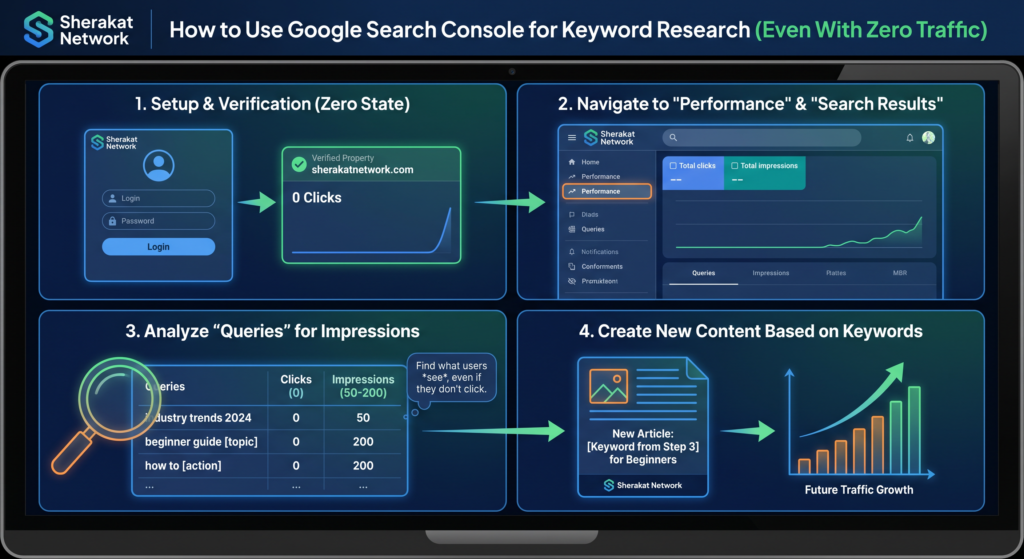
Google Search Console is not just for established sites. It’s the most accurate keyword research tool available, and it’s especially valuable when you’re starting from zero.
Key Takeaways:
- GSC shows actual queries, not estimates—data straight from Google
- Impressions matter more than clicks for zero-traffic sites—they reveal Google’s understanding of your content
- Striking distance queries (positions 11-20) are your fastest opportunities
- Regex filters unlock question keywords and non-brand opportunities
- High-impression, low-CTR queries are title/description optimization opportunities
- Unexpected queries reveal content gaps and confirmed relevance
- Export data to Google Sheets for deeper analysis (up to 25,000 rows)
- Iterate weekly—SEO rewards optimization, not volume
Your next step: Open Google Search Console. Go to Performance > Search Results. Sort by Impressions. Find one query where you rank position 11-20. That’s your next content project.
Frequently Asked Questions (FAQs)
Q1: What if my GSC shows zero impressions and zero queries?
A: Your site may be too new for GSC to have data. It can take 2-4 weeks after indexing for query data to appear. In the meantime, verify that your site is indexed by checking the Index Coverage report .
Q2: How do I know if a query is worth targeting?
A: Look for three signals: (1) You rank position 11-20 (striking distance), (2) The query has clear search intent, (3) You can create content that genuinely answers the query better than current results. All three together indicate a high-opportunity keyword.
Q3: What’s the difference between queries and keywords?
A: Queries are the actual phrases users type into Google. Keywords are the terms you choose to target. GSC shows you queries—real user behavior. Your keyword research is the process of deciding which queries to target .
Q4: Why does GSC show queries I never targeted?
A: Google understands semantic meaning. It associates your content with related queries based on topic, not just exact-match keywords. These “accidental” queries are clues about what Google thinks your site is about .
Q5: How often should I check GSC for keyword research?
A: Weekly for tracking optimizations, monthly for strategic review. SEO moves in patterns, not hours. Daily checks lead to over-reacting to normal fluctuations .
Q6: Can I use GSC for keyword research if I have multiple websites?
A: Yes. Each verified property has its own Performance report. You can analyze them separately or look for patterns across sites in the same niche.
Q7: What does “average position” actually mean?
A: It’s the average ranking position of your site for a given query over the selected time period. If you rank 5th for one search and 10th for another, your average position is 7.5. Position 1-10 is page one; 11-20 is page two .
Q8: How do I find question keywords in GSC?
A: Use regex filters. Add a Query filter with pattern: how|what|why|when|which|can|does. This shows only question-based queries .
Q9: What’s a good CTR in GSC?
A: It varies by position. Position 1 averages around 27%, position 2 around 15%, position 3 around 11%, and it drops sharply after that . Compare your CTR to position benchmarks, not absolute numbers.
Q10: Should I target queries with zero clicks?
A: Yes, especially if they have impressions. Zero clicks means Google is showing your page but users aren’t clicking. That’s usually a title/description issue—fixable with optimization .
Q11: How do I export GSC data for deeper analysis?
A: Click the Export button in the Performance report (limited to 1,000 rows) or use the Search Analytics for Sheets add-on for up to 25,000 rows .
Q12: What’s a striking distance keyword?
A: A query where you rank positions 11-20. You’re on page two—visible to Google but not most users. These are the fastest optimization wins .
Q13: How long does it take for GSC to show new data after I publish content?
A: Usually 2-3 days for impressions to appear, longer for clicks. GSC data has a known lag of 2-3 days .
Q14: Can GSC show me what my competitors rank for?
A: No. GSC only shows data for sites you verify ownership of. For competitor analysis, you need third-party tools or manual SERP analysis.
Q15: What’s the difference between GSC and Google Analytics?
A: GSC shows search performance (impressions, clicks, queries). GA shows on-site behavior (sessions, bounce rate, conversions). They complement each other .
Q16: How do I filter out branded queries?
A: Add a Query filter with “Doesn’t match regex” and your brand name or variations. This isolates non-branded discovery opportunities .
Q17: What does it mean if a query shows high impressions but position 50+?
A: Google is testing your relevance broadly but not committing to it. Focus on striking distance queries first (positions 11-20). Position 50+ queries are long-term projects, not quick wins.
Q18: How do I use GSC for local SEO keyword research?
A: Filter by country or use location-based queries (“[service] near me,” “[service] in [city]”). GSC shows local queries that trigger your content .
Q19: What if GSC shows the same query for multiple pages?
A: This is keyword cannibalization—your pages competing against each other. Consolidate content or differentiate each page’s focus. GSC reveals this problem directly .
Q20: Can I set up GSC for a subdomain or subfolder?
A: Yes. You can verify domain properties (covering all subdomains and protocols) or URL-prefix properties for specific sections .
Q21: How do I track keyword rankings over time in GSC?
A: Compare date ranges in the Performance report. Or export data monthly and track changes in a spreadsheet.
Q22: What’s the new AI-powered configuration in GSC?
A: An experimental feature (rolling out late 2025) that lets you describe what you want to see in natural language. GSC configures filters and metrics automatically .
Q23: Why are my impressions high but clicks zero?
A: Possible reasons: (1) You’re ranking below the fold or page one, (2) An AI Overview answers the query above your result, (3) Your title/description doesn’t match intent, (4) Your result looks less compelling than competitors .
Q24: Should I use GSC instead of paid keyword tools?
A: Use GSC for actual performance data and opportunity detection. Use paid tools for competitive analysis and volume estimates. They serve different purposes .
Q25: How do I find content gaps in GSC?
A: Look for queries with high impressions where you have no dedicated page. These are topics Google associates with your site but you haven’t fully addressed .
Q26: What’s the Performance report in GSC?
A: The section showing how your site performs in Google Search—queries, pages, countries, devices, and four core metrics (clicks, impressions, CTR, position) .
Q27: How long should I wait before optimizing based on GSC data?
A: At least 2-4 weeks after publishing. GSC needs time to collect data, and you need enough impressions to see patterns .
Q28: Can I use GSC on mobile?
A: The GSC web interface works on mobile browsers, but the experience is limited. For detailed analysis, use desktop.
Q29: What does “query not provided” mean?
A: GSC strips queries used by very small numbers of people for privacy reasons. You’ll see “(other)” or aggregated data for these .
Q30: What’s the one thing I should do differently after reading this guide?
A: Open GSC. Sort queries by impressions. Find one query where you rank 11-20. Optimize that page this week. Repeat.
About Author
[Sana Ullah Khan Kakar (Content and Article Writer Specialist]
This guide was written based on hands-on experience using Google Search Console for keyword research across dozens of new and growing websites since 2015. The strategies outlined here have been tested on sites ranging from zero traffic to thousands of daily visitors.
Free Resources
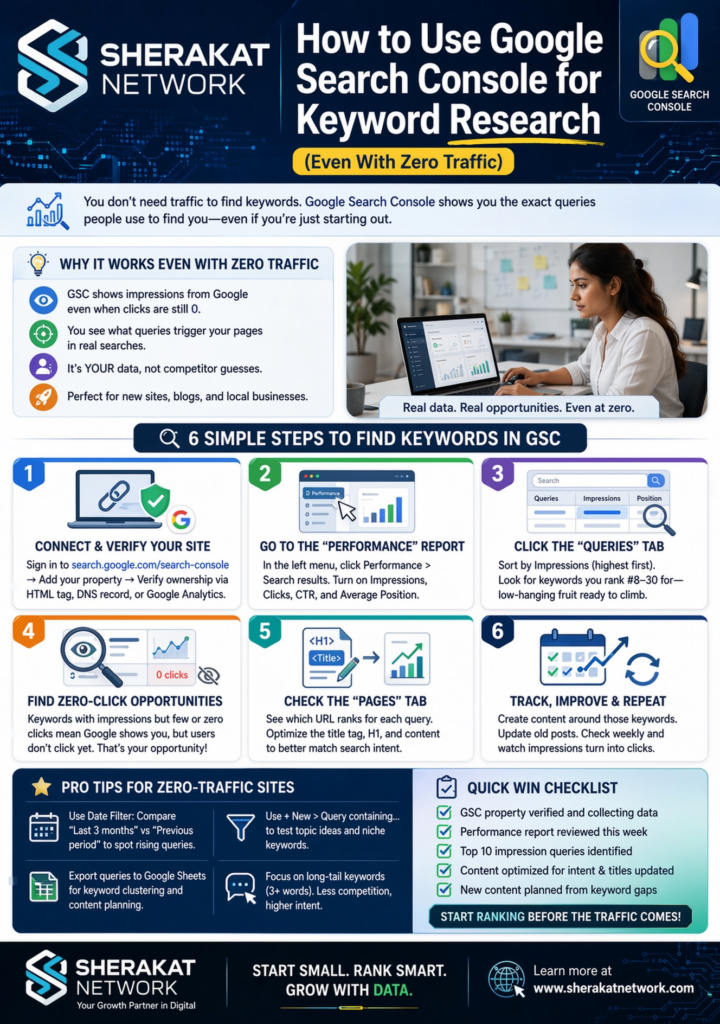
Google Search Console Tools:
- GSC Performance Report (Search Results)
- GSC Index Coverage Report
- GSC URL Inspection Tool
- Search Analytics for Sheets (Google Sheets add-on)
- GSC API
Recommended Reading on Sherakat Network:
External Resources:
- The Daily Explainer: Global Supply Chain Management Guide
- World Class Blogs: Remote Work & Productivity
Discussion
What’s your experience using Google Search Console for keyword research? Have you found striking distance keywords you never would have targeted otherwise? Share your insights in the comments below.
If you found this guide helpful, consider sharing it with someone who’s struggling to get their new site off the ground. The strategies here work—but only if you actually open GSC and use them.
Have questions? Reach out via our contact page.